

Manage Leads & Customers
A CRM shaped around how you actually sell.
Off-the-shelf CRMs ask you to work their way. A custom one starts from your pipeline, your stages and the information you genuinely need.
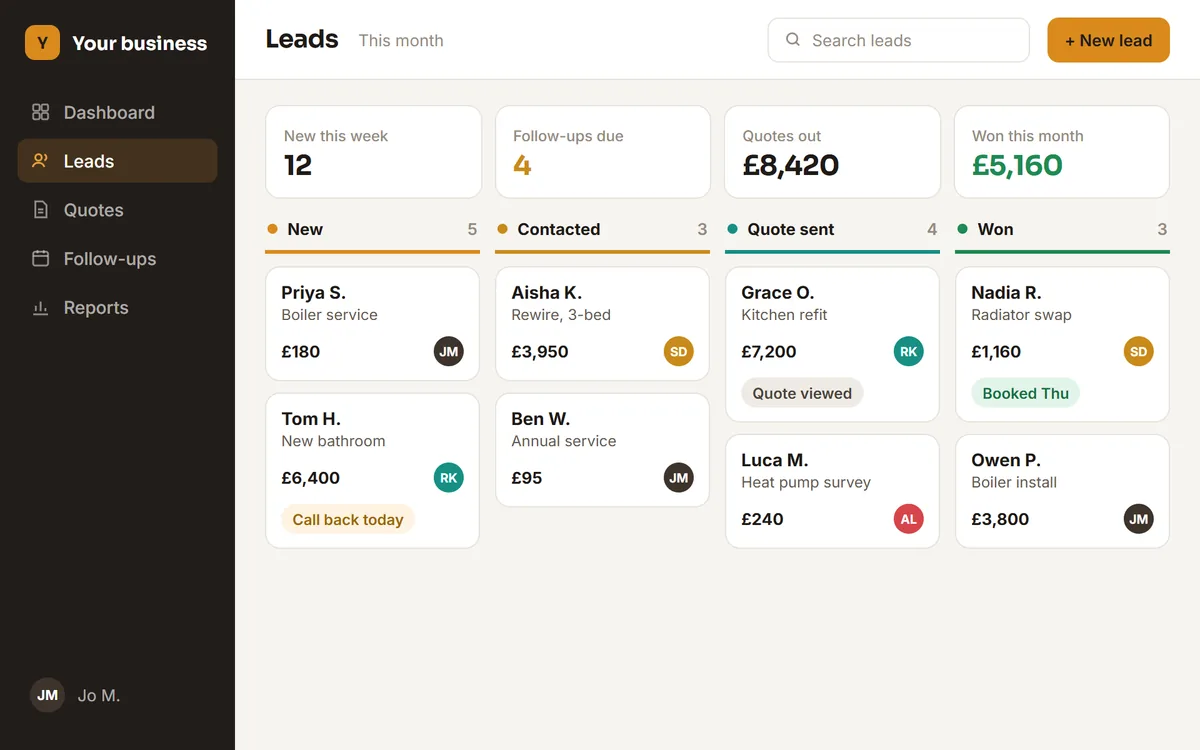
Designed example with invented sample data, not client work.
Sound familiar?
If more than one of these is true, this is usually the piece worth fixing first.
- Enquiries arrive in an inbox and nobody is sure who owns them.
- Follow-ups depend on someone remembering, rather than the system prompting.
- The history of a customer lives in one person’s phone or head.
- Quotes are rebuilt from scratch each time, in a separate document.
What a build includes
What you actually get
Scope is agreed before anything starts, so this is a starting point for that conversation rather than a fixed package.
Lead capture and ownership
Enquiries land in the system with an owner, a status and a date, whether they came from the website, the phone or a forwarded email.
A pipeline that matches your stages
Named for how you actually work, not "opportunity" and "negotiation" because a product decided that.
Follow-ups that surface themselves
Tasks and reminders attached to the customer, so the next step is visible rather than remembered.
Quotes and customer history together
What you quoted, what was agreed and every conversation since, on one record.
In practice
When a new enquiry arrives, assign it, schedule a follow-up and see exactly where it sits.
Where this fits
Examples of the shape of business this suits. Not a client list.
- Trades and home services quoting several jobs a week
- Clinics and practices handling enquiries alongside bookings
- Agencies and consultancies with a long conversation before the sale
- Schools and training providers tracking enrolment enquiries
Questions
Before you ask us
Why not just use an off-the-shelf CRM?
Often you should, and we will say so on the first call. A custom CRM earns its place when your process genuinely does not fit the tool, when the subscription cost per seat has grown faster than the value, or when the CRM needs to talk to the rest of your systems.
Can it work with the email and calendar we already use?
Yes. Connecting to what you already pay for is usually cheaper and less disruptive than replacing it.
What about the data already in spreadsheets?
Moving existing records across is part of the work, and it is one of the three things that shape a quote. Messy data takes longer than clean data, which is worth knowing early.
The other two
Run Jobs & Operations
Scheduling, staff, jobs, quotes, invoices and the daily workflow. Suits trades, maintenance, cleaning and property services.
Customer & Staff Portals
Dashboards, booking systems and account areas so customers or staff can serve themselves.
One conversation. A clearer next step.
Not every problem needs
custom software.
If an existing tool solves it properly, we’ll say so. The point is fixing the problem, not selling a build.
Tell us what’s slowing your team down.
Free first call, no sales pitch.